
Your Century account, now in your AI assistant
Ask about your positions, the markets, Trading Central research and upcoming economic events in plain language. Read-only, and always in your control.
Read-only
access
Sign in with your
Century login
No API keys,
nothing to install

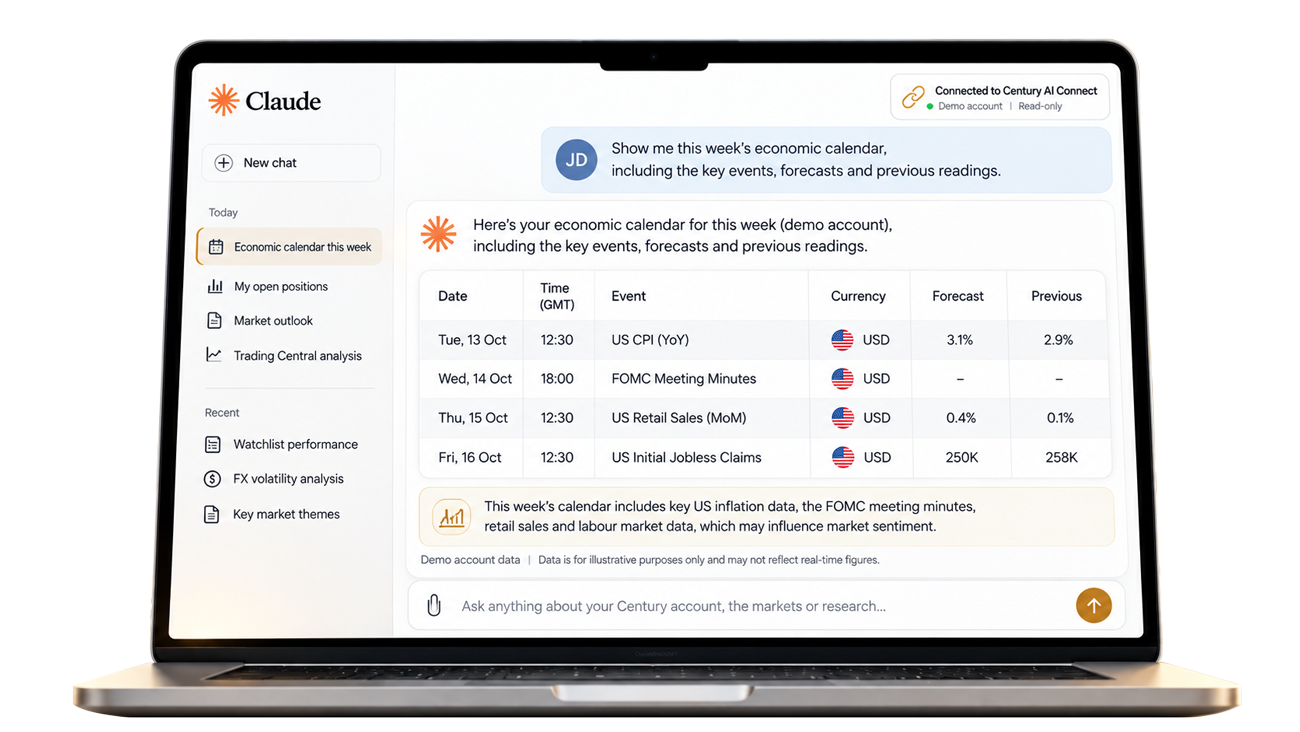
How it works
Three steps. One conversation.
-

Step 1Connect
Add Century as a connector in your AI assistant and sign in with your Century login. No API keys, no downloads.
-

Step 2Ask
Type your question in plain language: about your account, a market, or the week ahead.
-

Step 3Understand
Get answers built from your account, Century market data and Trading Central research, as tables, charts and summaries.
What you can ask
Ask it the way you'd ask a colleague
A few questions Century clients can try today. Answers are information only, not investment advice.
-
Example question 1: Which high-impact economic events are due in the next 48 hours, and how volatile have they been in the past?
AIClaudeNext 48 hours Economic calendarEvent Due Past volatility US Nonfarm Payrolls Thu 16:30 Eurozone CPI Flash Fri 13:00 US ISM Services Fri 18:00 Average move after past releases, shown as relative bars.
-
Example question 2: Summarise Trading Central's technical view and support and resistance levels for EUR/USD.
AIClaudeEUR/USD levels View: placeholder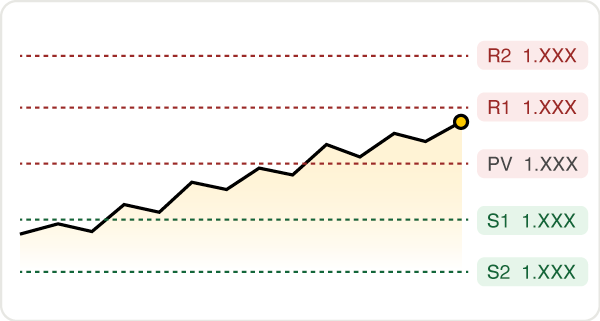
Research provided by Trading Central. Levels shown are placeholders.
-
Example question 3: Was the latest PCE figure above or below forecast, and how did gold move around the release?
AIClaude- Actual
- X.X%
- Forecast
- X.X%
- Previous
- X.X%
Gold around the release XAU/USD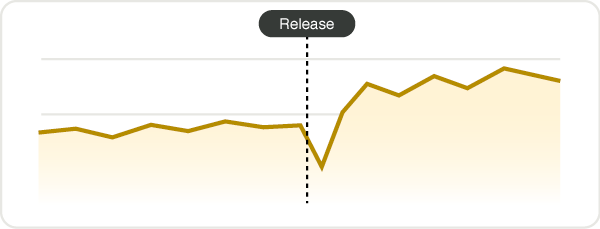
-
Example question 4: What's the news sentiment trend for Apple this week, and what are the top-ranked articles?
AIClaudeApple news sentiment This week- 1Positive
- 2Neutral
- 3Positive
-
Example question 5: Show my open positions and watchlist, and flag any high-impact events in the next 48 hours.
AIClaudeOpen positions Demo accountSymbol Side P/L Next 48h XAU/USD Buy +X.XX US NFP EUR/USD Sell -X.XX EZ CPI US500 Buy +X.XX None Watchlist
USD/JPYBrentGBP/USD -
Example question 6: Show my daily realised results for the last 30 days as a calendar.
AIClaudeDaily realised results Last 30 daysMTWTFSS 1234567 891011121314 15161718192021 22232425262728 2930Loss Gain
Read-only by design
Your AI can look.
It can't touch.
Century AI Connect gives your AI assistant read-only access to your account. It cannot place, change or close trades. It cannot deposit or withdraw funds. It cannot change your account settings. Every trading decision stays with you, on Century Trader.



-

You authorise it.
You sign in with your Century login on a secure Century page and approve read-only access.
-

You stay in control.
You choose which AI assistant to connect, and you can disconnect at any time.
-

Your password stays private.
Century never shares your password with the AI app.
Inside the connection
More than 50 tools in six groups
| Group | What your AI can see |
|---|---|
 My account | Profile, trading accounts, open positions, trading history and watchlist |
 Market data | Indicative prices for supported Century symbols, chart data, forex pairs and currency volatility |
 Trading Central research | Technical summaries, support and resistance, chart patterns, analyst consensus and written analysis |
 News and sentiment | Articles, rankings and sentiment trends |
| Economic calendar | Actual, forecast and previous figures, plus event volatility and explainers |
| Company information | Company profiles and announcements |
Research provided by Trading Central. Prices are indicative mid prices for information only.
Connect in 3 steps
Set up in about two minutes
Claude
In Claude, open Customize, then Connectors, then +, then Add custom connector.
-
Paste
https://, click Add, then Connect. Sign in with your Century login and approve read-only access.mcp.centuryfinancial.com /connect Ask your first question. Try: "What high-impact economic events are due this week?"
Works on all Claude plans. Free plans are limited to one custom connector.
Other MCP apps
Any AI assistant that supports remote MCP connectors with sign-in can use the same address. Add it as a remote connector and sign in with your Century login.
https://


- View your account information
- Trade, move money or change settings
Privacy and security
Built for trust
You connect through a secure Century sign-in page. The connection is read-only: it can view your account information but can't trade, move money or change settings. Once connected, your questions and the answers your AI receives are processed by your AI provider under its own terms and privacy policy, so please review them.
Century privacy policyFAQ
Frequently asked questions
Century AI Connect is a read-only connection between your Century account and AI assistants like Claude. Once connected, you can ask about your positions, the markets, Trading Central research and upcoming economic events in plain language.
Yes. Your AI assistant can view your account information, but it cannot place, change or close trades, deposit or withdraw funds, or change your account settings. Every trading decision stays with you, on Century Trader.
Claude, on all Claude plans. Free plans are limited to one custom connector. Any AI assistant that supports remote MCP connectors with sign-in can use the same address.
No. You sign in with your Century login on a secure Century page and approve read-only access. Century never shares your password with the AI app.
Yes. You choose which AI assistant to connect, and you can disconnect at any time.
No. Answers are information only, not investment advice. Prices are indicative mid prices for information only, and every trading decision stays with you.
Bring Century into your next conversation
Your account, Century market data and Trading Central research, in the AI assistant you already use.